Statements
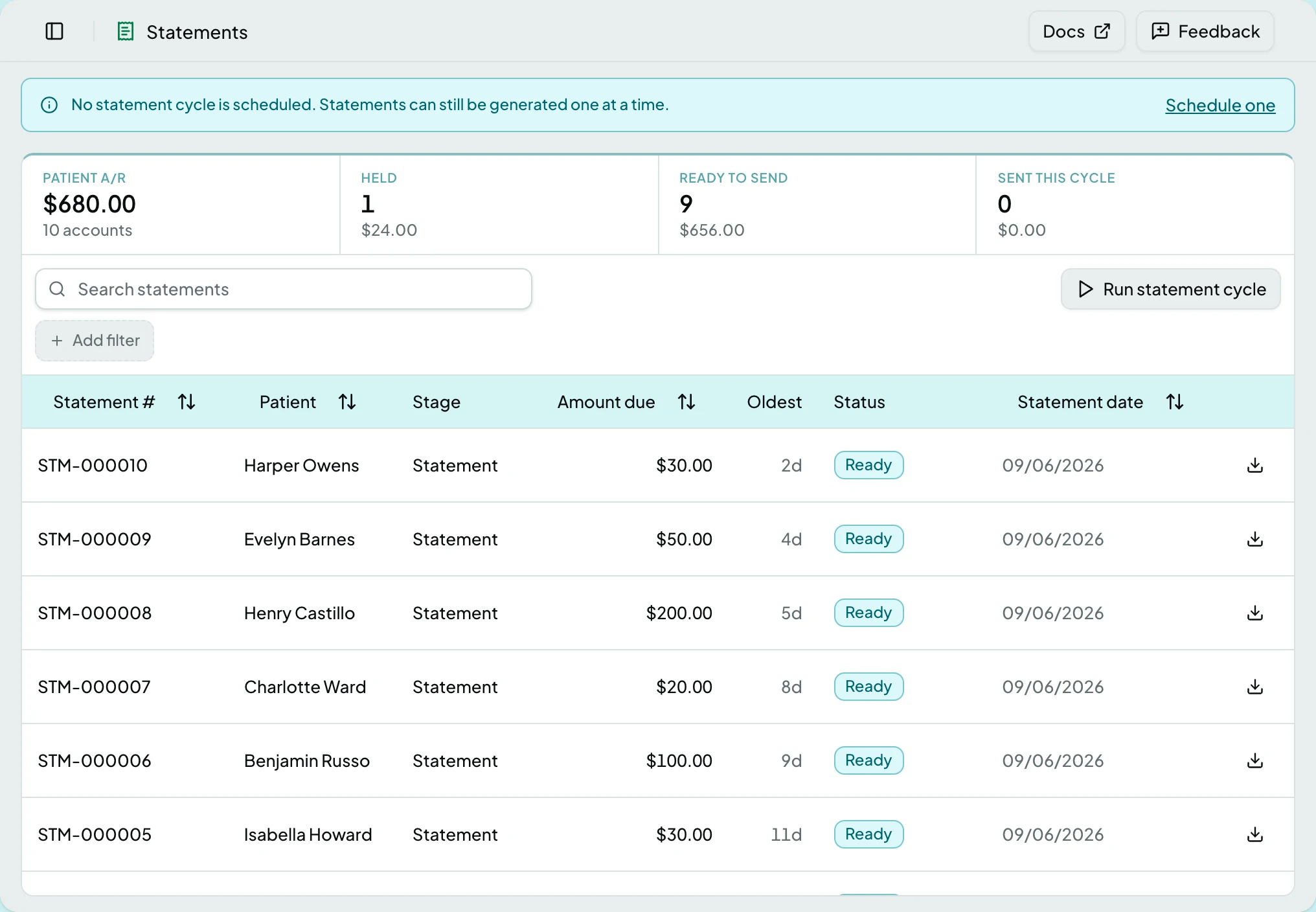
Every patient statement for the selected client, above the patient A/R it draws on: what is held, what is ready to send, and what went out this cycle. One statement in full is The Statement Page; the batches that carry them out are Statement Batches.
Who Can See It
Section titled “Who Can See It”User only, when the client is licensed for statements. Administrators and Managers have no access, as with Patients: every row carries a patient name.
The Tiles
Section titled “The Tiles”The tiles count the whole book, never the filtered list, so their totals reconcile against the ledger.
| Tile | What it counts | Selecting it |
|---|---|---|
| Patient A/R | Every open patient balance on the ledger, and how many accounts owe one | Nothing. It is a total, not a filter |
| Held | Statements in Held, with their total | Filters the list to Held |
| Ready to send | Statements in Ready, with their total | Filters the list to Ready |
| Sent this cycle | Accounts whose latest statement was sent since the last cycle started, with their total | Filters the list to Sent |
Selecting a tile again clears its filter. A tile shows a dash rather than a zero when its count could not be read, so a clean day and a failed count never look alike.
Stage Chips and Search
Section titled “Stage Chips and Search”Under the tiles, a Stage chip appears for every rung of the notice ladder that currently holds statements, each with its count. Rungs with none are not shown, so the row fills in as the cycle runs. One stage filters at a time.
Search matches the statement number, the patient’s name and their MRN.
The List
Section titled “The List”| Column | What it shows |
|---|---|
| Statement # | The statement number |
| Patient | Name |
| Stage | Where on the notice ladder this statement sits |
| Amount due | What it asks the patient to pay |
| Oldest | Age in days of the oldest open patient balance on the account. Not sortable |
| Status | The status, and for a held statement a short reason: address incomplete, billing restricted, QMB, do not bill, bankruptcy or secondary pending. A hold raised by a client rule shows its code instead |
| Statement date | When it was generated |
The list sorts by statement date, newest first, and a row opens the statement. Each row ends in a download icon that fetches the statement’s PDF; on a held statement it is greyed, and the tooltip says held statements do not have a document yet.
Actions
Section titled “Actions”| Action | What it does | When it is offered but greyed |
|---|---|---|
| Run statement cycle | Starts a cycle run now, with the same settings the schedule uses | While a run is starting or already going, when it reads Cycle running… |
A run mints one statement for every account with a patient balance at or above the minimum, and not billed within the cadence. The defaults are a $5 minimum and 30 days; an Administrator changes them on the schedule. Accounts under the minimum or in credit are counted, never billed. Each new statement is checked as it is made: one that passes is Ready, one that does not is Held and lands on the Statement Review queue.
While a run is going, a banner says when it started. Asking for a second run is refused until the first finishes. The run’s outcome, as counts of generated, held, under minimum and credit balances, is recorded on the task in Tasks.
Without a schedule, a banner says no statement cycle is scheduled and offers Schedule one. The button still runs a cycle with the defaults, and a single statement can be generated from the patient page.
Statuses
Section titled “Statuses”| Status | What it means |
|---|---|
| Draft | Not yet checked. Generation checks every statement as it makes it, so a statement is Held or Ready by the time it reaches the list |
| Held | The check found a blocking hold. The statement has no document, never batches, and waits on the Statement Review queue |
| Ready | Passed the check, and waits for the next batch |
| Sent | Left in a batch. Only the bill-to can change now, and editing it asks first |
| Void | Withdrawn. Kept for the audit trail; the balance stays on the account |
Stages
Section titled “Stages”The notice ladder. A run moves an account up one rung at a time, and only once the cadence has passed since its previous statement.
| Stage | Rung |
|---|---|
| Statement | 1 of 4, the first bill |
| Reminder | 2 of 4 |
| Second notice | 3 of 4 |
| Final notice | 4 of 4, and every notice after it |
States
Section titled “States”- Empty - the list says the statement cycle creates statements, or generate one from a patient.
- No statement cycle is scheduled - a banner, with Schedule one linking to Schedules. Not a fault: generating one statement at a time is a legitimate way to work.
- Statement cycle running - a banner with the start time, while the button reads Cycle running….
- A dash on a tile - that count could not be read.
- We couldn’t load statements - with a retry.
- Blocked - without the statements module the screen is not in the sidebar, and a saved link to it says the module is not part of your plan.
Related: The Statement Page · Statement Batches · Bill Patients for What They Owe · Patients · Transactions · Tasks