Visits
A visit is the encounter: who was seen, where, by whom, and what was done. Claims are generated from visits, never typed by hand, so a claim can only ever say what its visit says.
Who Can See It
Section titled “Who Can See It”User only, when the client is licensed for visits. Administrators and Managers have no access to visit data by design, which Roles and Access explains.
The List
Section titled “The List”| Column | What it shows |
|---|---|
| Visit # | The visit number |
| Patient | Who was seen |
| Admit Date | When the encounter started |
| Discharge Date | When it ended, or a dash |
| Status | Where the visit is in its life |
Statuses
Section titled “Statuses”| Status | What it means |
|---|---|
| New | Arrived, not yet checked |
| Ready | Readiness passed; a claim can be generated |
| Billed (Primary) | A claim went to the primary payer |
| Billed (Secondary) | A claim went to the secondary payer |
| Patient Responsibility | What remains falls to the patient |
| Completed | Nothing further is expected |
| Cancelled | The encounter did not happen, or was withdrawn |
Above the list, three figures count the whole client rather than the page you have scrolled to: Total, Unbilled and Cancelled. Unbilled is the one to watch - a visit that is New or Ready and has no claim behind it yet. Clicking it filters the list to exactly those, which is the shortest path from “are we leaving money on the table” to the visits responsible. The filter rail also narrows by Status.
The Visit Page
Section titled “The Visit Page”Two tabs, Overview and Claims.
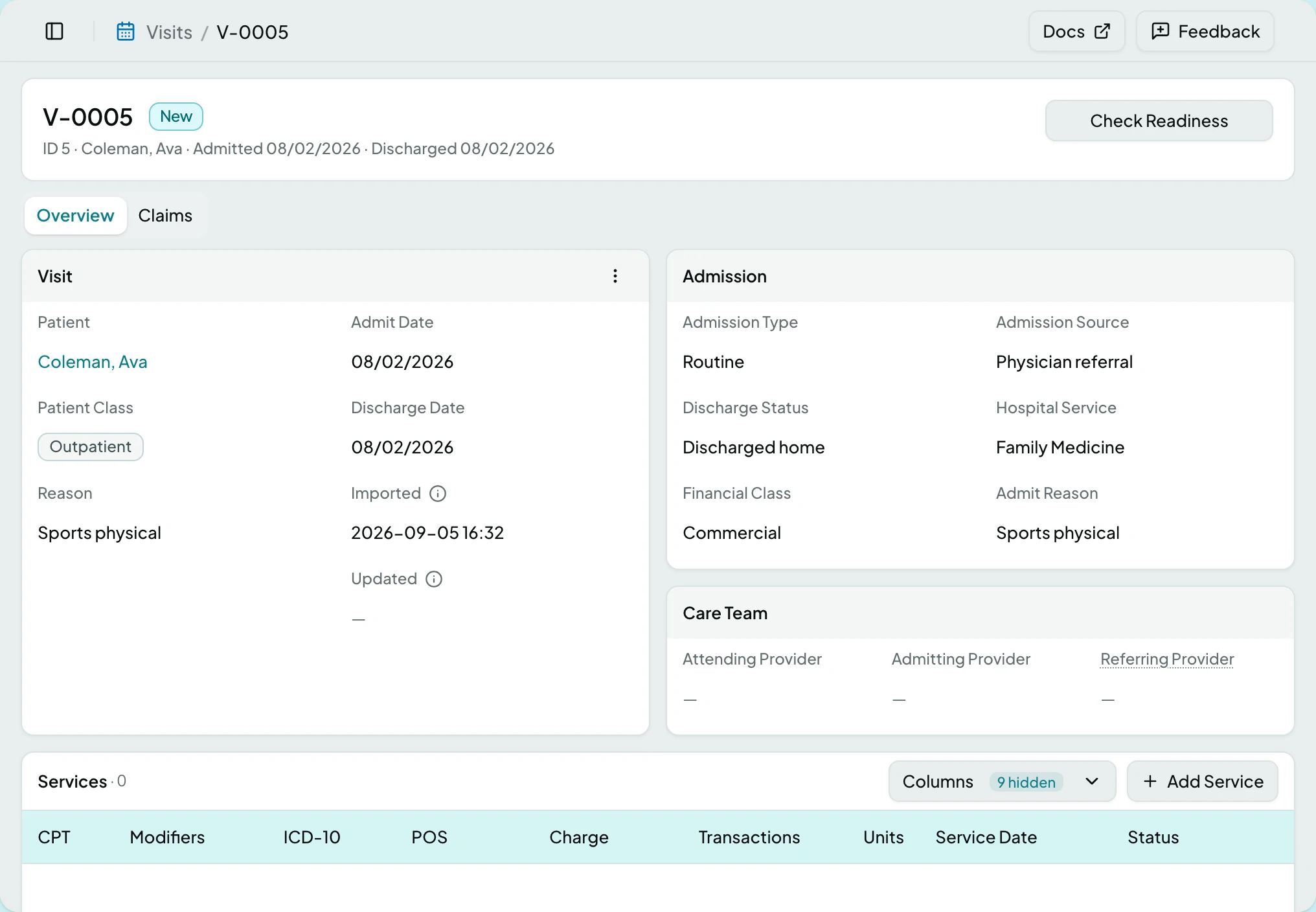
| Card | Fields |
|---|---|
| Visit | Patient, Patient Class, Reason, Admit Date, Discharge Date, Imported, Updated |
| Admission | Admission Type, Admission Source, Discharge Status, Hospital Service, Financial Class, Admit Reason |
| Care Team | Attending Provider, Admitting Provider, Referring Provider |
| Services | The service lines that become claim lines, each Captured, Billed or Voided |
Patient Class is one of Inpatient, Outpatient, Emergency, Preadmit, Recurring, Obstetrics or Unknown.
The Claims tab lists what has already been generated from this visit.
Readiness
Section titled “Readiness”Readiness is a live verdict rather than a status you set. The control beside the visit title counts the checks that are failing, and opening it names each one, why a failing check fails, and where to go and fix it.
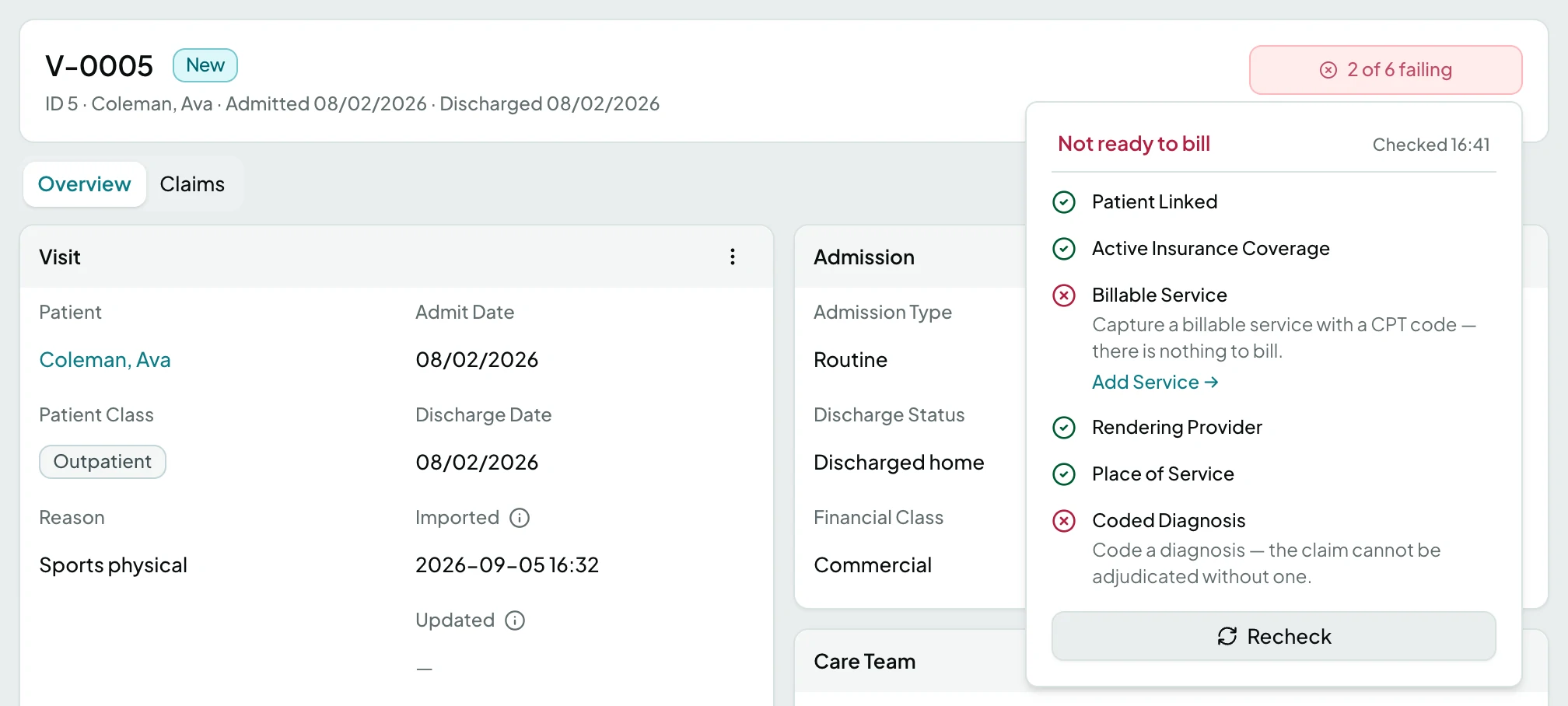
A visit that has moved past readiness - one that is already billed, or has a claim - reads Not applicable, because nothing will check it again.
Actions
Section titled “Actions”| Action | What it does | When it is offered | When it is offered but greyed |
|---|---|---|---|
| Check Readiness | Runs the readiness checks | Before the visit has a verdict | While a check is running |
| Generate Claim | Builds a claim from the visit | On the Claims card | Until readiness passes, with the tooltip listing what is unmet |
| Add Service | Adds a service line | On an active visit | - |
| Edit | Opens the visit for changes | Always | - |
| Cancel Visit | Withdraws the encounter | While not already cancelled | - |
| Restore Visit | Reverses a cancellation | On a cancelled visit | - |
| View History | Shows what changed and when | Always | - |
| Delete | Removes the visit | Always | - |
Regenerating rebuilds from the visit, so hand-edited claim fields are overwritten with what the visit says. ClaimPod asks before doing that.
States
Section titled “States”- Not applicable - readiness no longer applies to this visit.
- Couldn’t generate the claim appears inline with a Retry, rather than as a toast that scrolls away.
- The visit no longer exists if it was deleted while you were away.
- Empty - a client with no visits says so. Visits usually arrive through imports rather than typing.
- Blocked - without the visits module the screen is not in the sidebar, and a saved link to it says the module is not part of your plan.
Related: Patients · Providers · Generate a Claim from a Visit · The Claim Loop