Statement Batches
Ready statements leave in batches. A batch claims every statement that is Ready, renders them into one print-ready PDF bundle with a manifest beside it, and then never changes.
Who Can See It
Section titled “Who Can See It”User only, when the client is licensed for statements.
The List
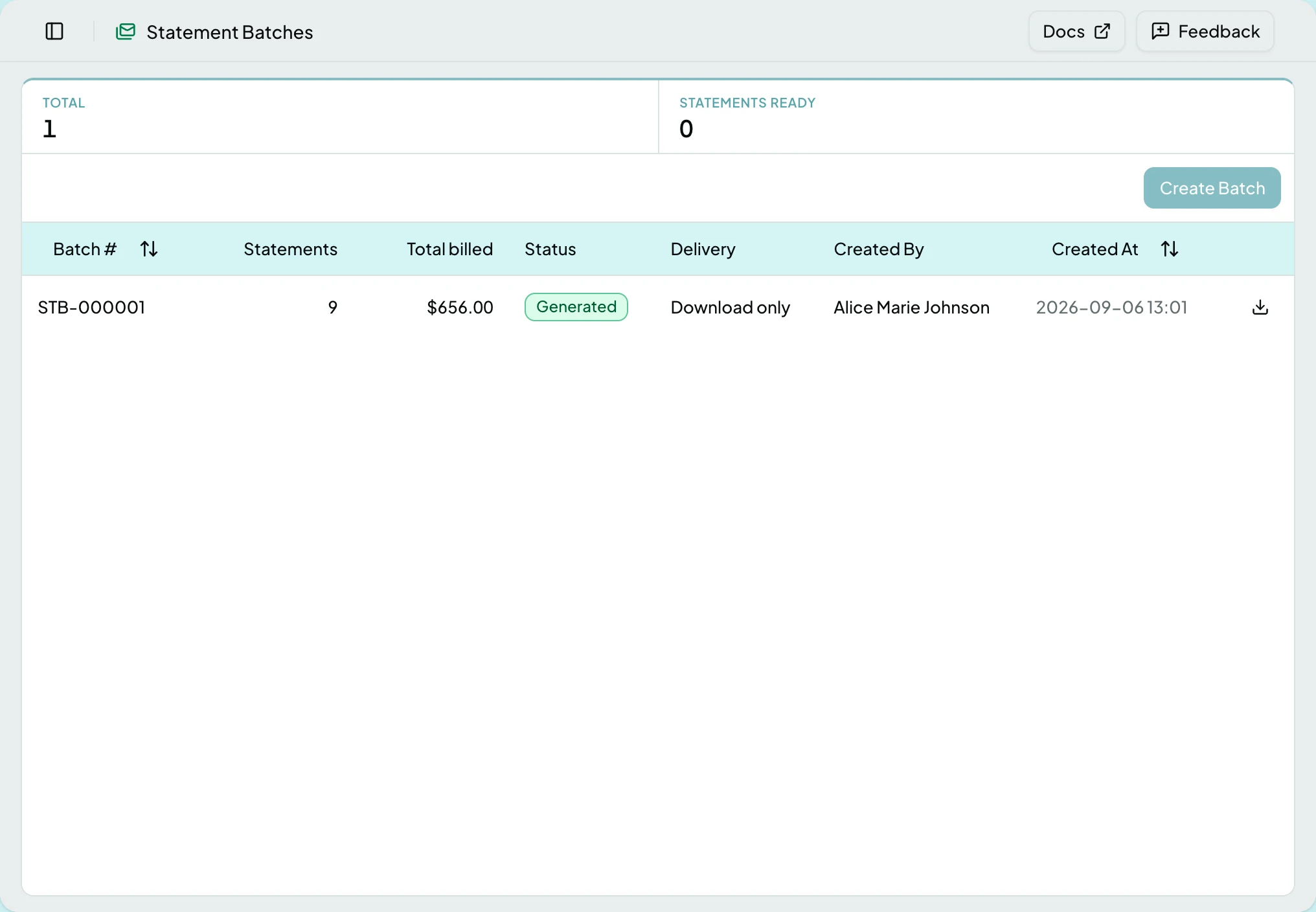
Section titled “The List”Statements Ready counts what the next batch would take; Total counts batches. Neither filters the list.
| Column | What it shows |
|---|---|
| Batch # | The batch number |
| Statements | How many it carries, and how many were excluded |
| Total billed | The sum of the statements it carries. A dash until the batch has a file |
| Status | Whether it generated and was delivered. A failed delivery appends its reason |
| Delivery | The connection it went to, or Download only once the file exists |
| Created By | Who created it |
| Created At | When |
Rows sort by batch number, newest first, and open the batch. Each row ends in a download icon for the PDF bundle, greyed until the batch has a file, with a tooltip saying it becomes available once the batch is generated.
Statuses
Section titled “Statuses”| Status | What it means |
|---|---|
| Pending | Queued for generation. The batch page updates itself |
| Generated | The bundle and manifest exist |
| No statements | Nothing was Ready when the batch claimed its statements. Two people creating a batch at once produce one of these |
| Failed | Generation failed. The statements stay Ready and ride the next batch |
| Transmitted | The files reached the connection |
| Transmit failed | Generated but not delivered. The files can still be downloaded, and the delivery can be re-run from Tasks |
Creating a Batch
Section titled “Creating a Batch”Create Batch is always on the list, greyed while nothing is Ready, with a tooltip saying no statements are ready to send. It opens Create statement batch, which says how many statements are ready and their total, and confirming with Create Batch starts the batch. Back on the list it sits as Pending until it generates.
A Deliver to picker, offering Download only or one of the client’s active connections, appears in the dialog whenever the client has one. Choosing a connection pushes the bundle and manifest into that connection’s output folder instead. If the client is not licensed for connections, the dialog says so in one line and the batch is download only.
A batch takes up to 500 statements; anything beyond that stays Ready for the next one. A batch is never edited or re-run: a retry is a new batch, so the mailing history stays honest.
The Batch Page
Section titled “The Batch Page”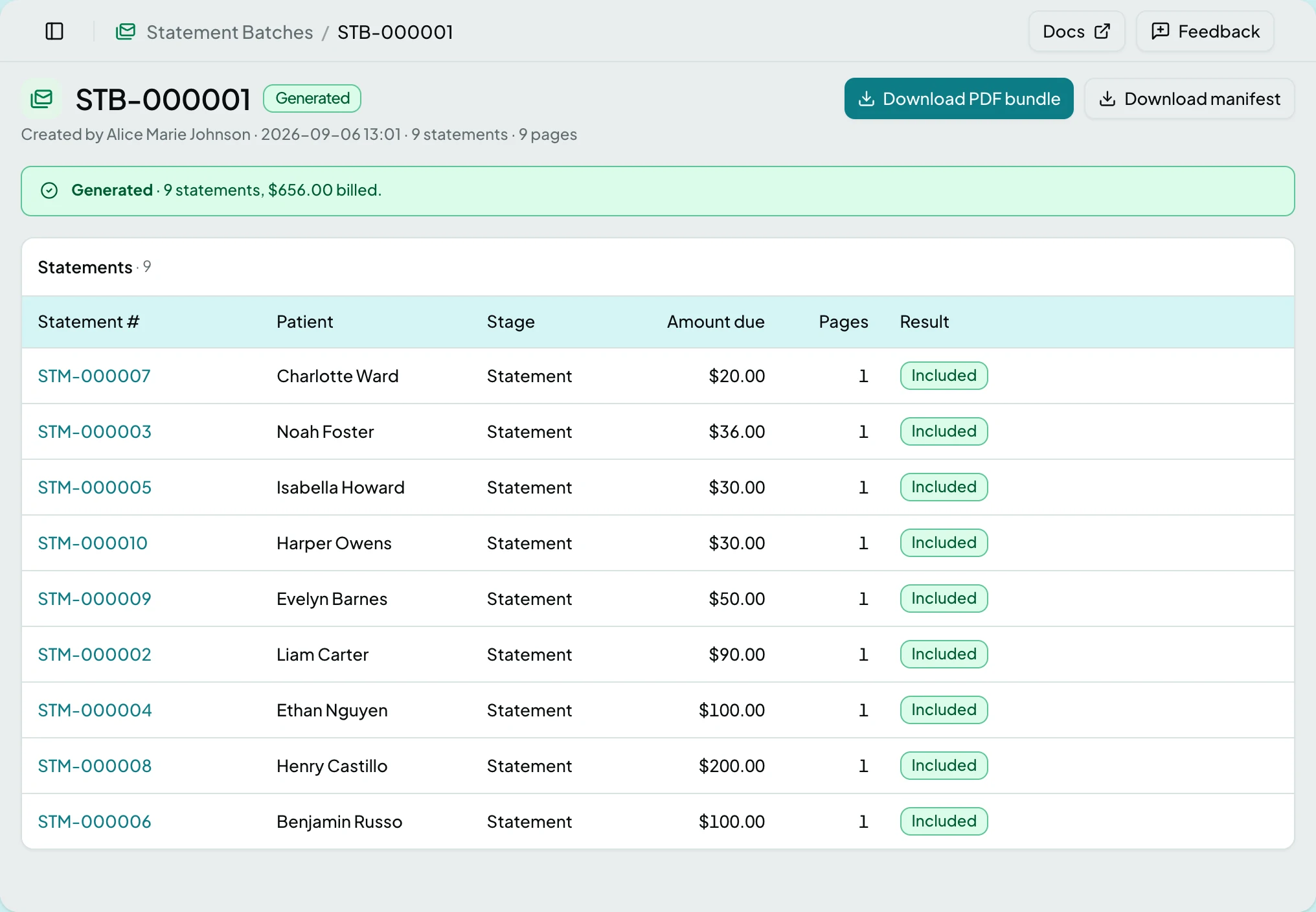
The header names the batch, its status, who created it and when, and how many statements and pages it holds. A banner beneath says how it went.
| Banner | When |
|---|---|
| Generating…, and that the page updates automatically | Pending |
| Generated, with the count and total billed | Generated or Transmitted, nothing excluded |
| Generated with N statements excluded: they stay ready and ride the next batch | Generated or Transmitted, with exclusions |
| The batch couldn’t be generated, with the reason | Failed |
| Generated but not delivered, with the reason. The file is ready to download, and the delivery can be re-run from Tasks | Transmit failed |
| Nothing was ready when this batch was claimed. | No statements |
| Section | What it holds |
|---|---|
| Statements | Every statement the batch claimed: excluded ones first, so the page reads as a fix-it list, then the rest in mailing order |
| Delivery | The connection, and when the batch was transmitted. Shown only once a connection or a transmission exists |
The Statements Table
Section titled “The Statements Table”| Column | What it shows |
|---|---|
| Statement # | Links to the statement |
| Patient | Name |
| Stage | The rung on the notice ladder |
| Amount due | What it asks for |
| Pages | How many pages it rendered to. A dash until it has |
| Result | Included, or Excluded with the reason. A dash while the batch is still pending |
A statement is excluded for one of these reasons:
| Reason | What happened |
|---|---|
| Held after the batch was claimed | A check put it back on hold between claiming and rendering. The hold’s own sentence follows |
| Voided after the batch was claimed | Someone voided it in the meantime |
| Already sent by another batch | A parallel batch got there first |
| No longer ready after the batch was claimed | Any other change of status |
| Statement no longer exists | It was deleted |
| The renderer refused this statement | The document could not be produced, with the cause |
| The batch couldn’t be generated, or the document renderer couldn’t be reached | The whole batch failed. Every statement carries this reason, and all stay Ready for the next batch |
Nothing excluded needs resetting: it is still Ready, and the next batch takes it.
Actions
Section titled “Actions”| Action | What it does | When it is offered |
|---|---|---|
| Create Batch | Claims every Ready statement into a new batch | On the list. Greyed while nothing is Ready, and not shown at all while the instance is in read-only mode |
| Download PDF Bundle | One PDF of every included statement, in mailing order | On a batch that has a file: Generated, Transmitted or Transmit failed |
| Download Manifest | A CSV with one row per included statement: statement and account numbers, the bill-to name and address, amount due, stage and page count | As above |
States
Section titled “States”- No statement batches yet on the list; released statements are batched from here.
- Generating… says the page updates itself, so there is nothing to refresh.
- This batch has no statements.
- Nothing was ready when this batch was claimed.
- The batch couldn’t be generated.
- Generated but not delivered.
- This statement batch isn’t in [client] if you follow a link scoped to another client, with a button back to the list.
- Read-only mode - Create Batch is not shown. The downloads still are.
- Blocked - without the statements module the screen is not in the sidebar, and a saved link to it says the module is not part of your plan.
Related: Statements · The Statement Page · Bill Patients for What They Owe · Connections · Tasks