The Statement Page
One statement as the patient will receive it, beside what the ledger says now, what is holding it, and the one thing that can change after it is generated. Statements is where you find it.
Who Can See It
Section titled “Who Can See It”User only, when the client is licensed for statements.
The Header
Section titled “The Header”The page opens with the statement number and its status badge, then the patient, the MRN, the stage and the amount due on one line, and Void statement on the right. Two tabs follow: Document, which is where the page opens, and Findings.
The Document
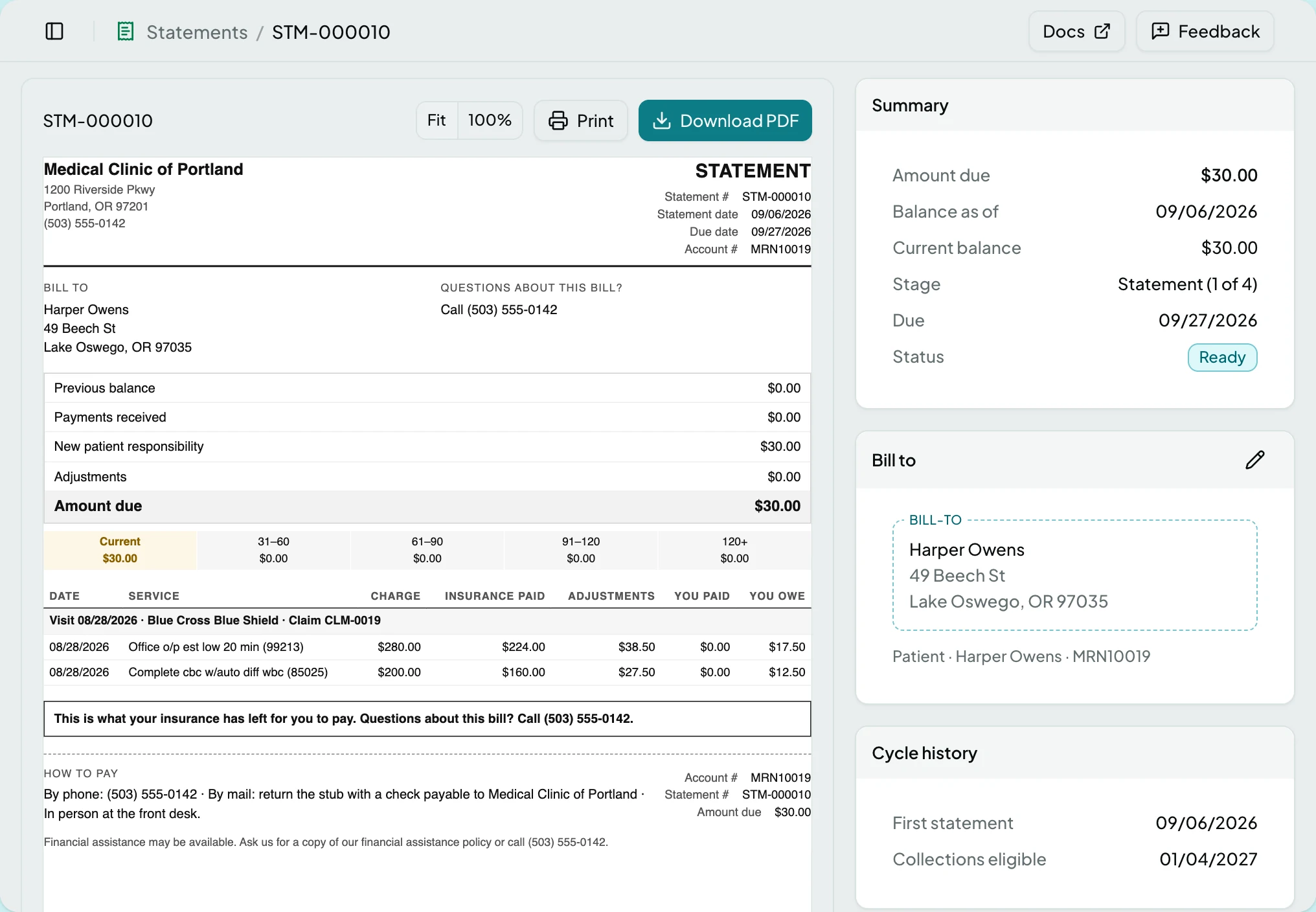
Section titled “The Document”On the Document tab the Statement card frames the statement exactly as it prints, one Letter page at a time, with the same margins the PDF has. The card header carries Fit and 100% zoom, Print and Download PDF. The app never lays the document out itself: the preview and the PDF come from the same render, so what you see is what the patient gets.
A held statement has no document. In its place the canvas says held statements do not print, and points you at Statement Review. A void statement still renders, watermarked, with a line saying when it was voided and by whom, kept for the audit trail.
Summary
Section titled “Summary”| Field | What it shows |
|---|---|
| Amount due | What the statement asks for, fixed when it was generated |
| Balance as of | The date that amount was read from the ledger |
| Current balance | What the ledger says now |
| Stage | The rung on the notice ladder, as 1 to 4 of 4 |
| Due | 21 days after the statement date |
| Status | The status badge |
When the two balances differ, a notice says why: a payment of that amount posted after the statement was generated, or new charges did. The statement itself never changes; the next cycle bills the difference.
The card appears only while something holds the statement; a statement with nothing holding it has no Holds card at all. Its header counts what is open, and each row carries a severity icon, the field it concerns where there is one, and the reason. Hovering the icon names the code. An error blocks release; a warning does not.
| Hold | Severity | Why, and where the fix lives |
|---|---|---|
| Address incomplete | Error | The bill-to lacks a name, street, city, state or ZIP. Fix it in Bill to |
| QMB | Error | A QMB restriction on the patient forbids collecting cost-sharing |
| Do not bill | Error | The account is flagged do-not-bill |
| Bankruptcy | Error | An automatic stay protects the patient |
| Unrecognised restriction | Error | A billing restriction ClaimPod has not learned yet. It holds rather than bills |
| Deceased | Warning | Confirm who to bill; the estate may be liable |
| Payment plan | Warning | The account is on an agreed schedule; check it before billing |
| Payer still adjudicating | Error | A claim on the statement is still with the payer. Billing now may mean refunding the patient |
| Open claim resolution | Warning | A claim on the statement has an open resolution that may change what is owed |
The restriction holds come from a billing restriction recorded against the patient, and each carries a Manage restrictions link to the patient’s Billing Restrictions card, where the restriction is confirmed or ended; a re-check after ending it clears the hold. The last two are client rules at the statement generated trigger, which an Administrator can adjust on Rules or add to.
Bill To
Section titled “Bill To”The one block of a statement that can change after it is generated. A wrong address is the one defect that makes the whole document useless, and reprinting an account to fix a street number is the wrong trade; everything else stays frozen so the statement reconciles against a payment.
The pencil, Edit bill-to, opens Name, Address, Address line 2, City, State and ZIP in place. All but the second address line are required: an empty name, street, city or ZIP says the envelope cannot be delivered without it, and Save Bill-To stays greyed until every required field is filled. Saving re-runs the check, so an address hold clears on its own, and the card then records who edited the bill-to and when.
On a Sent statement, saving asks first at This statement was already mailed: editing changes the copy on file, not the copy the patient received. Edit Anyway saves; Keep As Sent backs out.
Cycle History
Section titled “Cycle History”| Field | What it shows |
|---|---|
| First statement | When this patient was first billed. The collections clock runs from it |
| Collections eligible | The earliest date extraordinary collection action may begin: 120 days after the first statement, or 30 days after this notice, whichever is later. Computed, never typed |
Findings
Section titled “Findings”The Findings tab lists everything the last check produced, errors first, warnings after. Each row carries the message, the field it concerns where there is one, and the rule that authored it when a client rule did; the hardcoded holds name no rule. A line under the list says when the check ran, and stays even when the check found nothing. The Holds card on the Document tab shows the same findings; this tab is the full record.
Actions
Section titled “Actions”Most actions are not offered at all on a statement in the wrong state, rather than offered and greyed. Void Statement sits in the header; the document actions sit on the canvas toolbar.
| Action | What it does | When it is offered | When it is offered but greyed |
|---|---|---|---|
| Prints from the preview | Any statement that is not Held or Void | Until the preview has rendered | |
| Download PDF | Downloads the statement as a PDF | Any statement that is not Held | - |
| Edit bill-to | Opens the bill-to for editing | Any statement that is not Void | - |
| Save Bill-To | Saves the address and re-runs the check | While editing | While a required field is empty, or while saving |
| Cancel | Discards the edit | While editing | While saving |
| Void Statement | Withdraws the statement, after confirming | Any statement that is not Void | - |
| Try Again | Retries the render | When the preview failed | - |
| Manage restrictions | Opens the patient’s Billing Restrictions card | On a restriction hold in the Holds card | - |
Void Statement asks Void Statement followed by the statement number: voiding keeps the statement for the audit trail but takes it out of the cycle, and the balance stays on the account. Void Statement confirms; Cancel backs out. Voiding clears the holds and closes the statement’s review item, so nobody is asked to decide it twice.
States
Section titled “States”- Held - the canvas says held statements do not print and offers Open in Statement Review. Print and Download PDF are absent.
- No findings on the Findings tab when the last check was clean.
- Void - the document carries a VOID watermark and a line naming who voided it and when. Print, Edit bill-to and Void Statement are gone.
- A balance notice - a payment or new charges posted since the statement was generated.
- This statement couldn’t be rendered - the data is intact. Try Again re-renders; report it if it keeps failing.
- This statement isn’t in [client] if you follow a link scoped to another client, with a button back to Patients.
- Blocked - without the statements module the screen is not in the sidebar, and a saved link to it says the module is not part of your plan.
Related: Statements · Statement Batches · The Queue Processor · Bill Patients for What They Owe · Patients · Rules