Patients
The registry for the selected client, and the record every visit, claim and payment traces back to.
Who Can See It
Section titled “Who Can See It”User only, when the client is licensed for patients. Administrators and Managers have no access to patient data by design, which Roles and Access explains.
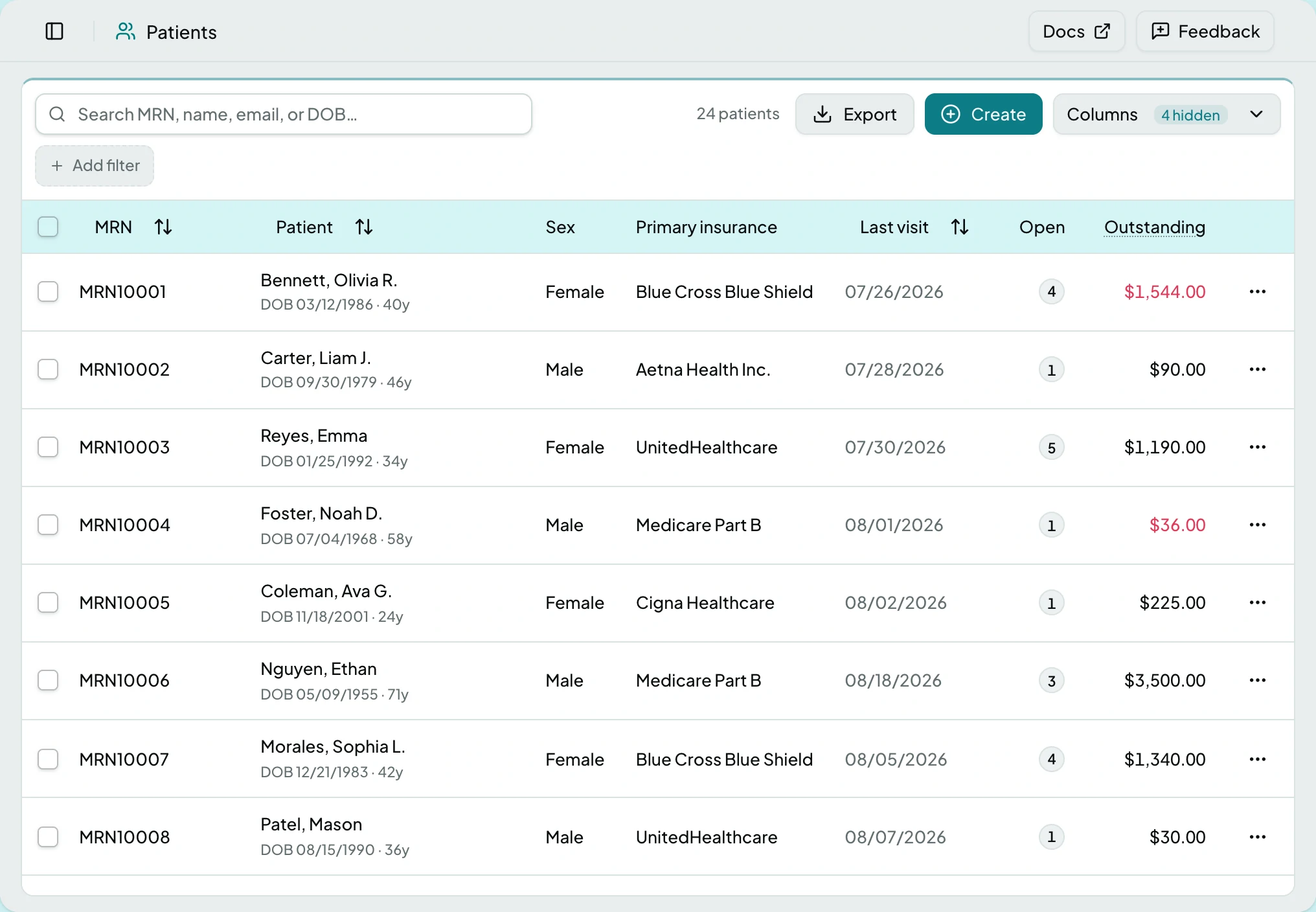
The List
Section titled “The List”| Column | What it shows |
|---|---|
| MRN | The medical record number, and the identity the registry is keyed on |
| Patient | Name |
| Sex | As recorded |
| Primary insurance | The coverage claims will bill first |
| Last visit | When they were last seen |
| Open | How many claims are open for them |
| Balance | Unpaid claim balances owed by payers |
| Email, Marital status, City, Created | Available from the column menu, hidden by default |
The list filters and searches, and rows can be selected for a bulk Export or Delete.
The Patient Page
Section titled “The Patient Page”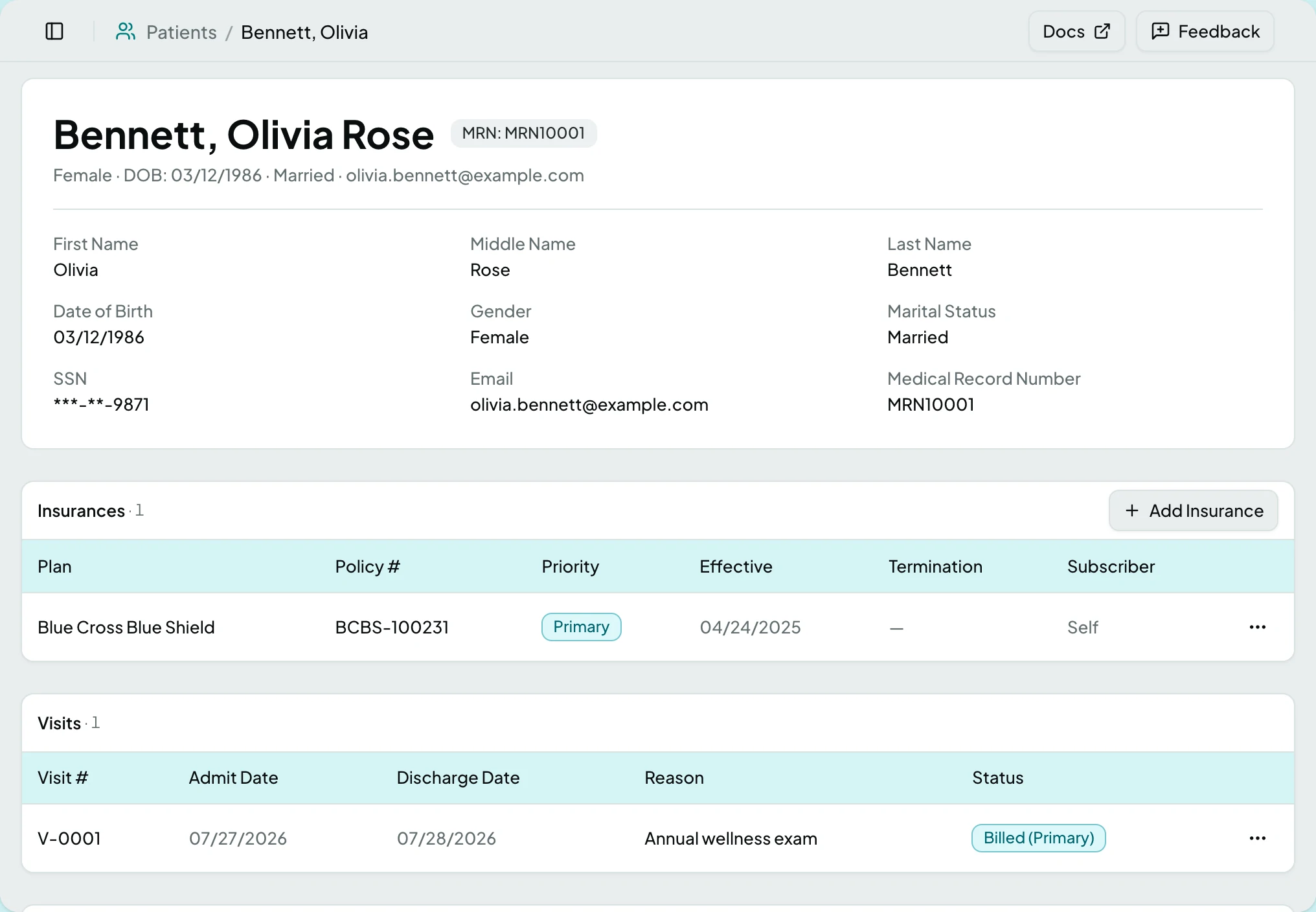
No tabs. Demographics sit at the top, with the MRN beside the name, then six cards.
| Field | |
|---|---|
| First Name, Middle Name, Last Name | Name as it will appear on a claim |
| Date of Birth, Gender, Marital Status | Demographics payers check |
| SSN | Masked, showing only the last four digits |
| Contact | |
| Medical Record Number | The registry key |
| Card | What it holds |
|---|---|
| Insurances | Coverage in the order it bills: Primary, Secondary, Tertiary |
| Billing Restrictions | Every reason this account must not be billed - QMB, deceased, bankruptcy, payment plan or do not bill - with its reason, where it came from and its window. Rows read Proposed when an ERA remark raised them and nobody has confirmed them yet, Active while they stand, Scheduled before they start and Ended afterwards. A Proposed row holds statements just as an Active one does |
| Visits | Every encounter for this patient |
| Claims | Every claim tracing back to them |
| Transactions | The ledger for this patient, with a running total |
| Statements | Every statement generated for this patient, with its stage, amount due, status and a download of the document. A row opens the statement |

Patient data usually arrives through imports rather than typing, but any field can be corrected in place when the source was wrong.
Actions
Section titled “Actions”| Action | What it does | When it is offered |
|---|---|---|
| Add Insurance | Adds a coverage to the patient | On the Insurances card |
| Add Restriction | Records a reason not to bill this patient, with the date it takes effect and, if known, the date it ends | On the Billing Restrictions card |
| Generate Statement | Bills this patient now, outside the cycle, from the balance on the ledger | On the Statements card. Greyed when the patient has no balance to bill, or the account carries a credit, and the tooltip says which |
| Export | Downloads the selected patients | Once rows are selected |
| Delete | Removes the selected patients | Once rows are selected |
Each insurance row can be edited, deleted, or shown with its history. Each restriction row can be shown with its history; a Proposed row can be confirmed, which records that you agree with the ERA and changes nothing else; and any row that has not ended can be ended, which asks End Billing Restriction? with an optional reason, closes the window today and keeps the row as history. Nothing deletes a restriction.
States
Section titled “States”- Empty - a client with no patients says so.
- This patient isn’t in this client if you follow a link scoped elsewhere.
- No statements for this patient on the Statements card.
- No billing restrictions on this account on the Billing Restrictions card.
- This patient already has an open restriction of this type when adding a second one of a kind that still stands; end the first before adding another.
- Blocked - without the patients module the screen is not in the sidebar, and a saved link to it says the module is not part of your plan.
Related: Visits · Insurance Plans · Claims · Statements · The Claim Loop