Claim Batches
Filing happens in batches. A batch gathers the claims that are Ready, produces what the payer receives - an 837P file for electronic payers, printed CMS-1500 forms for paper ones - and then never changes.
Claim batches are listed on the Claim Batches tab of Batches.
An electronic batch is numbered CLB-, a print batch PRB-.
Who Can See It
Section titled “Who Can See It”User only, when the client is licensed for claims.
Statuses
Section titled “Statuses”| 837P batch | CMS-1500 batch | What it means |
|---|---|---|
| Pending | Pending | The batch is being generated |
| Generated | Generated | The file or the forms exist; the claims are filed |
| Validation Failed | Validation Failed | No claim passed validation, so nothing was filed |
| Failed | Failed | Generation itself failed |
| Transmitted | Printed | The file reached its connection, or the forms reached their printer. The mailing date is recorded separately and never changes this |
| Transmit Failed | Print Failed | The file could not be delivered, or the forms could not reach the printer. The claims stay filed |
The Batch Page
Section titled “The Batch Page”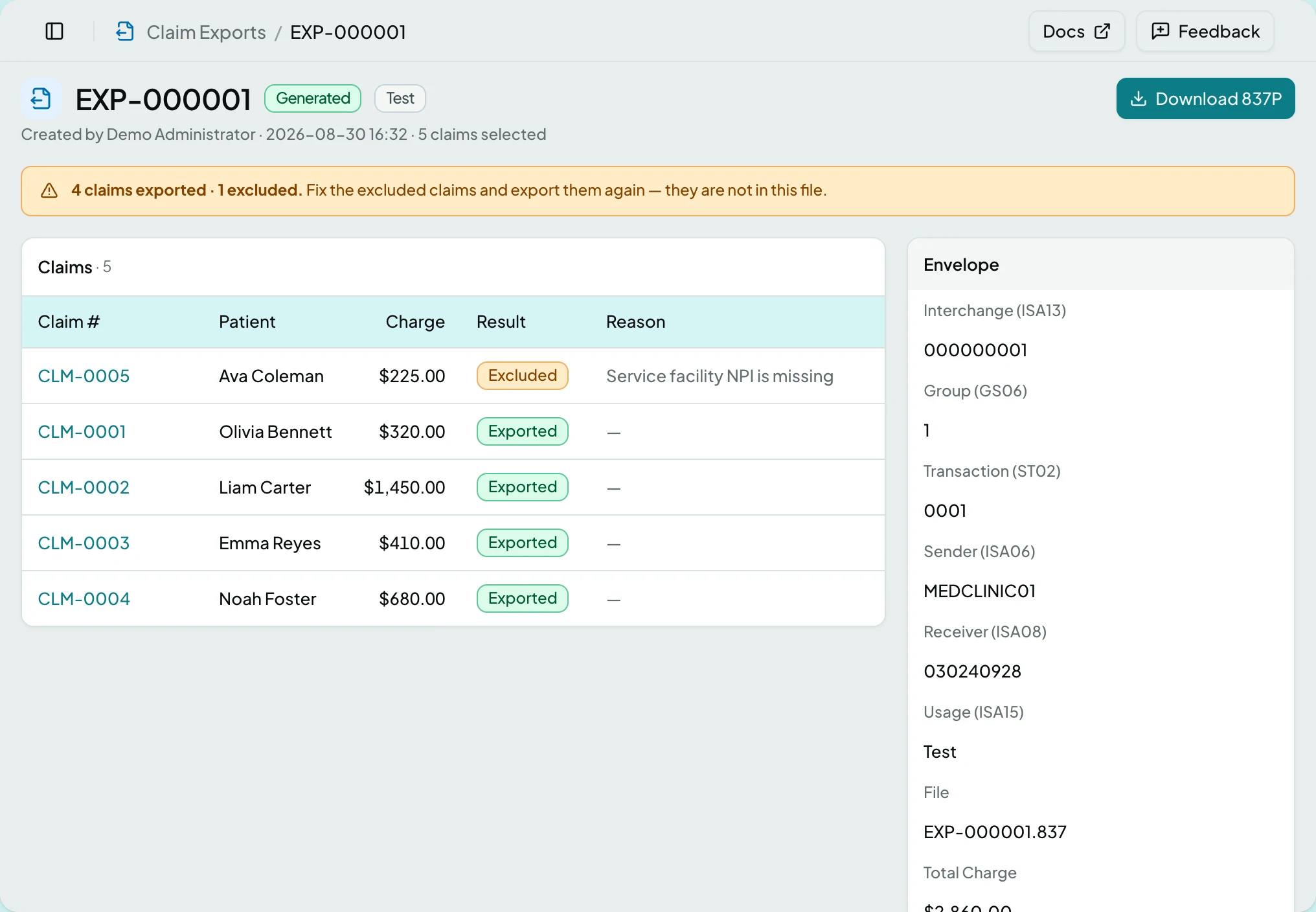
The header carries a Format badge, CMS-1500 or 837P, beside the status. Once a 999 or TA1 has come back for an 837P file, a chip gives its result: Accepted, Accepted With Errors or Rejected after the acknowledgment’s name, as in 999 Accepted With Errors. A test batch’s badge then reads 837P · Test.
| Section | What it holds |
|---|---|
| Acknowledgments | Above Claims, once the clearinghouse has answered: Received, Type, Result, Claim, Where and Problem for each answer |
| Claims | Every claim in the batch, each Exported (or Included on a print batch) or Excluded with a reason; while any batch is still building, its members read Pending. Excluded claims sort first, so the page reads as a fix-it list. An excluded claim went back to Draft with its reasons in Findings, and waits in Claim Review. An excluded claim removed later, for example by Cancel Visit, keeps its claim number, patient and charge, is marked Removed and no longer links to a claim. A print batch adds how many form pages each claim takes |
| Envelope | Beside the Claims and Deliveries cards: the EDI control numbers Interchange (ISA13), Group (GS06), Transaction (ST02), Sender (ISA06), Receiver (ISA08) and Usage (ISA15), then the File name and the Total Charge |
| Deliveries | Every attempt to deliver the batch, newest first: whether it is still Sending, Landed or Failed, the file, the connection or printer, who sent it, and when. The latest 25 are listed |
| On a print batch, in place of Envelope, beside the cards: Format, the Template the forms were drawn with, Forms (the page count), and Mailed (the day and who recorded it, or Not yet) |
Usage (ISA15) is what distinguishes a test file from a live one.
Actions
Section titled “Actions”| Action | What it does | When it is offered |
|---|---|---|
| Create Claim Batch | Creates a batch from every Ready claim - one for the electronic claims, one for the paper ones, in one go | On the Claim Batches tab of Batches, once something is ready. Electronic claims also need EDI settings; paper claims never do |
| Download 837P | Retrieves the generated file | On an 837P batch that produced one |
| Resend Rejected Claims | After a confirmation, voids each rejected claim in the file, reverses its charge and creates a new draft from the chart, to check and export again | On an 837P batch whose file the clearinghouse rejected, for a Manager or Administrator. Not shown in read-only mode |
| Deliver | Sends the file to a connection you pick, or a print batch’s forms to a printer | On the Deliveries card of any batch that produced its file or forms. Greyed when the client has nowhere active to deliver to |
| Download PDF | Retrieves the forms, aligned for the batch’s printer, for red CMS-1500 stock | On a print batch that produced them |
| Download Plain-Paper Copy | The same forms drawn on the form itself, watermarked COPY. For your records, never for the payer | In the menu, on a print batch that produced its forms |
| Download Primary Adjudication | A PDF of what the primary payer decided on each secondary claim in the batch, to mail with the forms. A tertiary claim gets one page per earlier payer | In the menu, on a print batch that carries secondary claims with a primary adjudication |
| Mark Mailed | Records the day the envelope went out, and sets each claim’s Filing Date to it | On a print batch that produced its forms and has no mailing date yet |
| Change Mailing Date | Corrects that day, and the claims’ Filing Date with it. A batch is never un-mailed | In the menu, once mailed |
Batches also start from the Claims list: select Ready claims and use Export… in the bulk bar to file only those.
Create Claim Batch opens Export Claims, which says how many claims are
ready and how they split, then shows a group per format, headed like 837P batch · 4 claims and CMS-1500 batch · 2 claims. The 837P group’s Deliver
to Connection offers Download only or one of the client’s active
connections, and starts on the connection you used last, else the first active
one, else Download only. The CMS-1500 group’s Printer picks where the
forms print, and defaults to the printer you used last. If the client is not
licensed for connections, the 837P group says so in one line and the file is
download only.
When the export starts, a toast says “Export started” with the number of claims. If one format’s batch could not be made, the other is still made and the toast turns into an error that stays until you close it, naming how many claims were not batched and why; those claims stay Ready. Exporting a single claim from its page says whether the batch was sent to its connection, downloaded, or created but not sent.
A print batch goes to its printer the way a file goes to a connection: right after it is generated, and again from Deliver, where the picker lists the client’s printers as well as its connections. A printer that could not be reached leaves the batch reading Print Failed with the claims filed. ClaimPod never prints again on its own, because a retry that half worked prints twice, and a printer that already printed the batch refuses a second delivery; to print again, use Download PDF and print from the browser. A delivery already in progress is refused until it finishes.
If a printer takes the job but never confirms it, the delivery stays Sending and the batch reads Print Failed, because ClaimPod cannot tell whether the forms came out. Check the printer before printing again. After ten minutes a new Deliver to that printer marks the unconfirmed attempt Failed and still refuses to send, so a batch is never printed twice by accident; print from the browser if the forms did not come out.
Deliver opens a dialog with a Deliver to picker listing the client’s active connections, and on a print batch its printers too, with the batch’s own connection or printer chosen. A connection that already holds the file receives nothing, so delivering again is always safe: only what has not arrived is sent. While it runs, the button reads Delivering… and the card updates on its own. If everything had already arrived, the card says there was nothing to send; if the delivery was refused, it says why.
States
Section titled “States”- Generating… says the page updates itself, so there is nothing to refresh.
- This batch has no claims.
- N claims exported · M excluded. - fix the excluded claims and export them again; they are not in this file. A print batch says included rather than exported.
- The clearinghouse rejected this file - with the acknowledgment and its date: the claims in it are now Rejected and wait in Follow-up Claims. The banner names the claims to fix, then resend with Resend Rejected Claims.
- No claims passed validation - nothing was exported.
- No claims passed validation - nothing was printed. on a print batch.
- The export failed.
- The print batch failed.
- The file was generated but could not be delivered. Deliver it again from Deliveries.
- No deliveries yet. on an 837P batch that has never been delivered.
- Print Failed - the forms exist and the claims are filed; deliver again from Deliveries or print from the browser.
- Sending on a delivery attempt that is still in progress - the page updates itself. On a printer it can also mean the printer never confirmed the job.
- Read-only mode - Deliver, Resend Rejected Claims, Mark Mailed and Change Mailing Date are not shown. The downloads still are.
- Test Mode - the format badge reads 837P · Test; such a file must not be submitted for payment.
- Blocked - without the claims module the Claim Batches tab is not shown, and a saved link to a batch says the module is not part of your plan.
Batches are immutable: a permanent record of what was filed and when. Exporting again makes a new batch rather than a revision of the old one, so the filing history stays honest. Delivering is different: an 837P batch can be delivered again from its own page, and the Deliveries card records every attempt.
Related: Claims · The Claim Page · Export Ready Claims · A Claim Will Not File