Document Templates
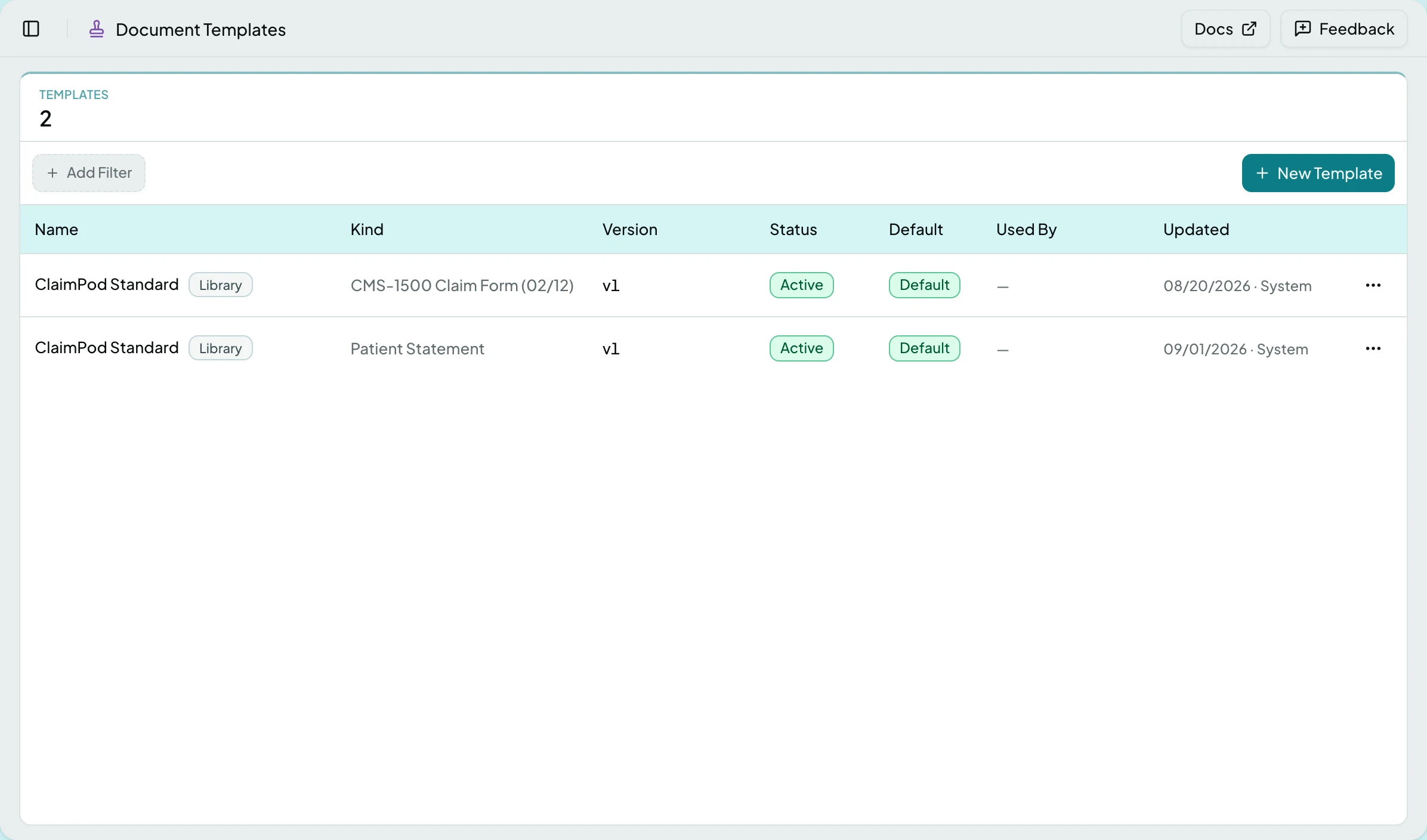
Every document ClaimPod prints - a patient statement, a CMS-1500 claim form - is made from a template. A template holds the wording your practice uses, the logo at the top, and the small choices each field allows. The layout is fixed: you decide what a field says, not where it sits. Templates are the Document Templates tab of Data Mapping in the sidebar.
Who Can See It
Section titled “Who Can See It”Administrator only, for the kinds the client is licensed for: statements bring Patient Statements, claims bring CMS-1500 Claim Forms. Templates are configured against example data, never a real patient.
The Library
Section titled “The Library”One table lists every template, by kind, then the kind’s default, then name. Add Filter narrows it to one kind, and appears only when more than one kind is licensed. Every kind ships with ClaimPod Standard, the default until you pick another.
| Column | What it shows |
|---|---|
| Name | The template, with a chip saying where it stands against ClaimPod’s own: Library while untouched, Modified once you have changed it, Update Available when ClaimPod released a newer standard, Retired when ClaimPod no longer ships it |
| Kind | The kind’s name, such as Patient Statement or CMS-1500 Claim Form (02/12) |
| Version | The version printing now |
| Status | Draft, Active or Superseded |
| Default | Whether its kind falls back to it. Each kind has exactly one |
| Used By | How many records pin it. Hovering names them: insurance plans for a claim form, billing profiles for a statement |
| Updated | When it last changed |
Patient Statements
Section titled “Patient Statements”Every label, heading and format on the statement is yours to word. The layout and the tone of each stage’s notice stay ClaimPod’s. Its example picker offers First statement, Final notice and Bill-to differs from patient.
| Group | Field | What you can change |
|---|---|---|
| Masthead | Title | The document’s name, STATEMENT as shipped |
| Masthead | Statement Details | The Statement #, Statement date, Due date and Account # labels, and the date format: 09/24/2026 (MM/DD/YYYY) or Sep 24, 2026 (Mon D, YYYY). The format applies to every date the statement prints, dates inside wording included |
| Bill-To | Bill-To Address | The Bill to heading, and the Patient: label that prints before the patient’s name when someone else is billed |
| Bill-To | Questions Line | Its heading and wording |
| Summary | Balance Summary | The six row labels (previous balance, payments received, new patient responsibility, adjustments, amount due, and credit on account, which prints below the amount due when the patient holds money the office has not applied yet) and how a credit prints: ($40.00) or -$40.00 |
| Summary | Aging | The five bucket labels, Current to 120+ |
| Detail | Line Items | The seven column headers, the Self-pay label for a visit no insurance was billed for, the visit header, which can use {serviceDate}, {payer} and {claimNumber} (a denied visit adds why it was not covered), and the Account Charges heading over charges on the patient’s account that no claim carries, such as a missed-appointment fee |
| Notice | Statement, Reminder, Second and Final Notice | The wording for each stage. {previousDueDate} is the due date of the statement before this one, which the Reminder names as when payment was due; the clause drops on a first notice |
| Pay Stub | How to Pay | Its heading and wording |
| Pay Stub | Stub Details | The Account #, Statement # and Amount due labels on the tear-off stub |
| Footer | Financial Assistance | The wording |
| Page Margins | Page Header, Page Footer | Left and right wording in the top and bottom margin of every PDF page, using {practiceName}, {accountNumber} and {statementNumber}; the footer adds {page} and {pages} |
The statement number, due date, amount due and credit on account labels can never be blank, nor can the financial-assistance wording, which 501(r) requires on every billing statement. Rewording a template changes statements made afterwards, never one already sent.
CMS-1500 Claim Forms
Section titled “CMS-1500 Claim Forms”The layout is the NUCC 02/12 form and never changes; a template decides the handful of choices payers disagree on. Its example picker offers Office visit · 2 lines, Injection with NDC · 8 lines and Auto accident · other coverage.
| Box | Option | Choices |
|---|---|---|
| Carrier | Print Payer Address | On or off. Most payers want the address in the window; some pre-address their forms |
| 11 | Print When | When present or Always (NONE when empty). Medicare wants NONE when there is no other insurance |
| 14, 15, 16, 18, 24A | Date Format | 8-digit (MM DD YYYY) or 6-digit (MM DD YY) |
| 19 | Source | Claim · Narrative or Fixed text, with a Text box for the fixed wording |
| 31 | Signature Text | What prints in place of a wet signature |
| 32 | Print When | Always, Only when different from Box 33 or Never |
| 33 | Print Phone | Whether the billing phone prints in the top right of the box |
| 24A | Single-day services | Repeat From date or Leave blank in the To column |
| 24J | Print Taxonomy | Whether ZZ and the rendering taxonomy print in the shaded half |
Actions
Section titled “Actions”| Action | What it does | When it is offered |
|---|---|---|
| New Template | Opens Create Statement Template or Create CMS-1500 Template, which starts a template from the ClaimPod standard or as a copy of one you already have. When more than one kind is licensed, the dialog has a Kind field, set to the kind the table is filtered to | Always |
| Open | Opens the template in the configurator | Always |
| Open Draft | Opens the draft in progress instead of the active version | While a draft exists |
| Duplicate | Copies the template, wording and all, under a new name | Always |
| Rename | Changes the name only. Nothing about what prints changes. If someone else changed the template after you opened it, the rename is refused with a notice above the form, and Reload refills it (A Save Was Refused) | Always |
| Set as Default | Makes this the template its kind uses when nothing else is chosen | When the template has an active version |
| Delete | Removes the template. Documents already printed keep the version that made them | Not offered on the default. Greyed while records pin it, saying, for example, “Unpin it from 2 insurance plans first.” for a claim form, or billing profiles for a statement |
Delete asks “Delete Template ‘{name}’?” and removes nothing until you confirm with Delete.
The Configurator
Section titled “The Configurator”Three panes: the fields, the document, the inspector. Below 1280 px they fold - a Fields toggle opens the list, and the inspector opens as a side sheet.
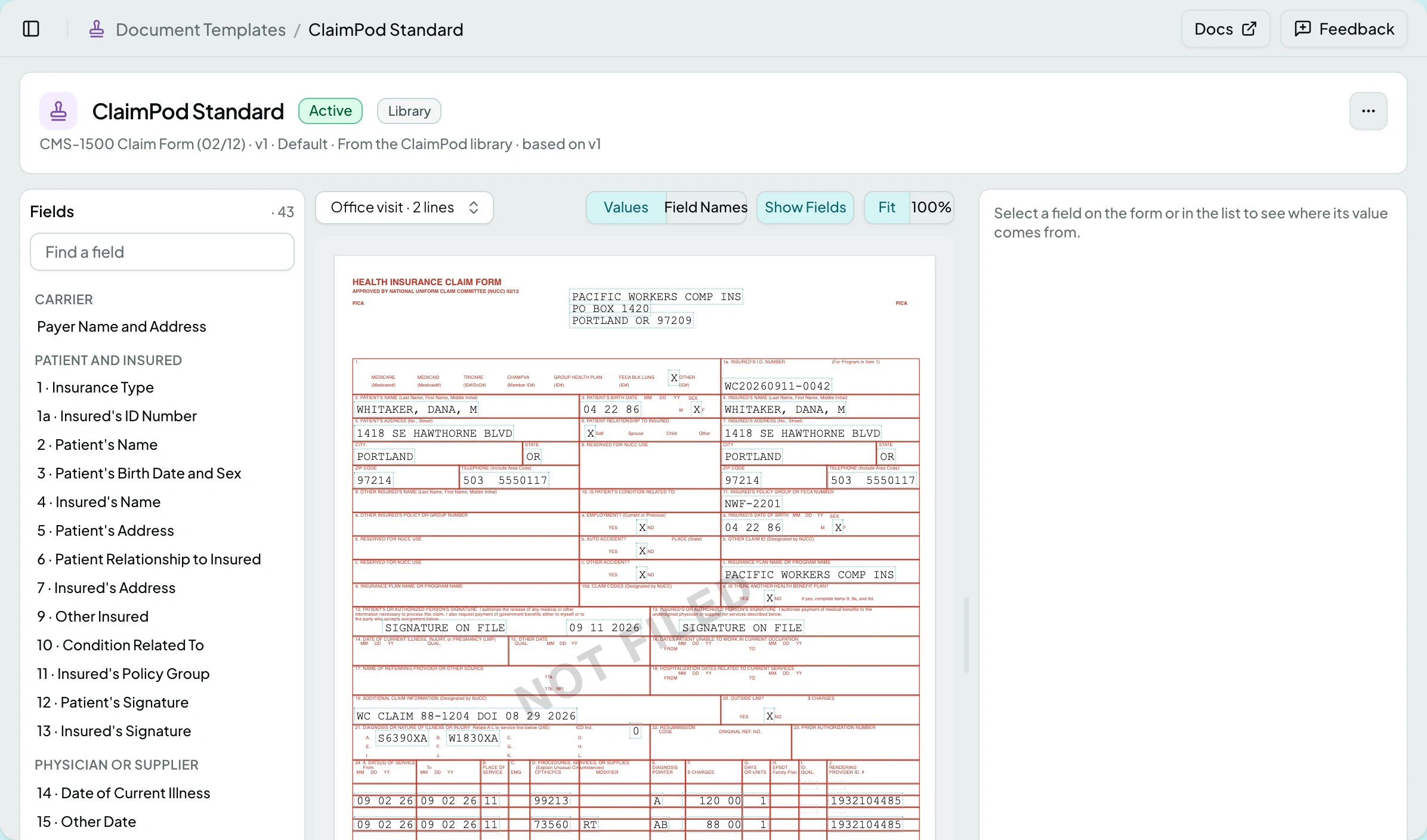
The document is rendered from the example the picker names. Click any highlighted part to select that field. Show Fields outlines every field region, and Values / Field Names swaps the example values for names.
The header’s menu holds Version History, Rename, Duplicate, Set as Default and Delete. Cancel on a changed template asks Discard Changes? first. If someone else saved the template after you opened it, the save is refused and the save bar offers Reload, which drops your unsaved work and loads what is stored (A Save Was Refused).
The Inspector
Section titled “The Inspector”Source - where the value comes from, with a choice where the field offers one.
Options - what you can change. Wording fields take text, with a character limit shown as you type. Some fields accept an image, such as the logo. A field you have changed is marked Edited, and Reset to Default puts the standard’s value back.
How It’s Filled - the steps applied before the value prints and what each produced, including where a value too long for its space was cut.
Wording and Merge Fields
Section titled “Wording and Merge Fields”Wording can name a value in curly braces, such as {practiceName}. The values
this document offers sit as chips under the wording box; anything else is
reported as unknown before you save.
Square brackets guard a part of a sentence. [Call {practicePhone}.] prints only
when the practice has a phone number, so a blank value never leaves a sentence
half-written.
Versions
Section titled “Versions”A template’s active version is what prints. It is never edited in place.
- Change anything on an active template and ClaimPod starts a Draft. The active version keeps printing.
- Keep editing the draft as long as you like. Save Changes stores it.
- Activate promotes the draft - Save & Activate when there is unsaved work - and the old version reads Superseded. Documents made from now on use it; documents already made keep the version that made them.
Version History lists every version with who edited and activated it. Restore as Draft brings an old version back as the draft, which never disturbs what is printing; with a draft already there it asks Replace Draft first.
Updates From ClaimPod
Section titled “Updates From ClaimPod”When ClaimPod improves a standard template, the template says an update is available and what changed.
| Action | What it does |
|---|---|
| Review Update | Opens Review Library Update: What Changed carries ClaimPod’s note, a table shows each field as it reads in the library version yours was based on, in the new library version, in Yours and In the new draft, and Couldn’t Carry Over lists any edit the new version has no place for |
| Create Draft | Takes the update as a draft, with your saved edits re-applied, to review and activate yourself. With a draft already there it asks Replace Draft first |
| Keep Mine | Keeps your wording and stops offering this release |
Nothing is ever applied for you.
Choosing a Template
Section titled “Choosing a Template”A kind’s default is used unless a record points somewhere else. The default billing profile pins the statement template - only that profile’s choice counts
- and an insurance plan pins the CMS-1500 template its claims print with. The pin is offered where the choice belongs, not on this screen.
States
Section titled “States”- Empty - a kind with nothing in it reads “No templates yet - start one from the ClaimPod standard.”
- Unlicensed - with neither statements nor claims licensed the screen reads “This client isn’t licensed for any printed documents.”
- Read-only - an older version opened from the history shows its wording without editable options. Restore it as a draft to change anything.
- Not an Administrator - the screen is not offered. Templates decide what every patient and payer reads, so only an Administrator can change one.
Related: The Statement Page · Billing Profiles · Insurance Plans